
在Wagtail网站中提供 RESTful API 服务
Wagtail 是一个基于Django 的内容管理系统(CMS)。它提供了友好的管理页面,可以方便地管理各种内容。它还基于Django REST Framwork 提供了专用的Wagtail API 模块(wagtail.api.v2 ),可以很方便地将原始内容以 JSON API 的方式开放给客户端使用。使用Wagtail API,可以轻松开发前后端分离的项目。本文的内容主要参考Wagtail的官方文档:
https://docs.wagtail.io/en/v2.8.1/advanced_topics/api/v2/configuration.html
基本配置
激活Wagtail API模块
修改Django的配置文件settings.py,将wagtail.api.v2应用增加到 INSTALLED_APPS 列表中
# settings.py
INSTALLED_APPS = [
 ...
'rest_framework ', # 非必须
 'wagtail.api.v2',
 ...
]
也可以同时将 rest_framework 应用增加到 INSTALLED_APPS 列表中,这样就可以直接在浏览器中查看API,方便调试,否则,在浏览器查看时,会报找不到模板的错误。但这对于基本的JSON 格式的API不是必须的。
配置路径(endpoints)
接下来,配置需要通过 API 暴露的内容。每种类型的内容(例如页面、图片、文档)有其自己的API 路径。这些路径以URL 路由的方式组合起来,可以在项目中挂载到某个上级路由下使用。
Wagtail 提供了如下三个路径类
- 页面:
wagtail.api.v2.views.PagesAPIViewSet - 图片:
wagtail.images.api.v2.views.ImagesAPIViewSet - 文档:
wagtail.documents.api.v2.views.DocumentsAPIViewSet
通过继承这些路径类,可以定制其功能。另外,如果要增加新的内容类型,可以继承路径基类 wagtail.api.v2.views.BaseAPIViewSet 。
在应用目录下创建api.py文件,内容如下,其中注册了上面列出的三种类型内容的API 路由
# api.py
from wagtail.api.v2.views import PagesAPIViewSet
from wagtail.api.v2.router import WagtailAPIRouter
from wagtail.images.api.v2.views import ImagesAPIViewSet
from wagtail.documents.api.v2.views import DocumentsAPIViewSet
# Create the router. "wagtailapi" is the URL namespace
api_router = WagtailAPIRouter('wagtailapi')
# Add the three endpoints using the "register_endpoint" method.
# The first parameter is the name of the endpoint (eg. pages, images). This
# is used in the URL of the endpoint
# The second parameter is the endpoint class that handles the requests
api_router.register_endpoint('pages', PagesAPIViewSet)
api_router.register_endpoint('images', ImagesAPIViewSet)
api_router.register_endpoint('documents', DocumentsAPIViewSet)
然后,将上面的API 路由添加到项目urls.py的路由列表中
# urls.pyfrom .api import api_router
urlpatterns = [
 ...
url(r'^api/v2/', api_router.urls),
 ...
 # Ensure that the api_router line appears above the default Wagtail page serving route
 url(r'', include(wagtail_urls)),
]
配置完成后,就可以通过 /api/v2/pages/ 访问页面API,通过/api/v2/images 访问图片API,通过/api/v2/documents 访问文档API。页面类型可能会有子类型,有时可能只需要查看某种具体子类型的页面,Wagtail API支持这种过滤到页面子类型的查询。例如我们可能在blog应用下增加了继承于Page 类的 BlogPage 子类,此时可用 /api/v2/pages/?type=blog.BlogPage 来访问该子类型页面API。
增加自定义字段
经过上面的简单配置,虽然能够提供页面API,但其返回的JSON 响应中只包含最基本的字段,例如
"title",多数情况下我们需要为自定义的类型返回自定义的字段,这可以通过在应用的models.py文件中增加api_fields列表来实现
# blog/models.pyfrom wagtail.api import APIFieldclass BlogPageAuthor(Orderable):
page = models.ForeignKey('blog.BlogPage', on_delete=models.CASCADE,related_name='authors')
name = models.CharField(max_length=255)# 需要通过API 提供的字段列表
api_fields = [
APIField('name'),
]class BlogPage(Page):
published_date = models.DateTimeField()
body = RichTextField()
feed_image = models.ForeignKey('wagtailimages.Image', on_delete=models.SET_NULL, null=True, ...)
private_field = models.CharField(max_length=255)# 需要通过API 提供的字段列表
api_fields = [
APIField('published_date'),
APIField('body'),
APIField('authors'), # 在API响应中嵌套BlogPageAuthor 对象
]
这样就能通过访问API获取到BlogPage的 "published_date", "body"1 字段以及包含"name"字段的 "authors" 列表。需要注意的是,这些字段是只在子类型中定义的,需要在API 中使用?type参数过滤到BlogPage子类型,结合fields参数才能访问这些字段,例如 /api/v2/pages/?type=blog.BlogPage&fields=published_date,body,authors(name) &format=json,如果要查看所有通过api_fields暴露的字段,可以用fields=*。API 返回的响应示例如下:
{
 "meta": {
 "total_count": 10
 },
 "items": [
 {
 "id": 1,
 "meta": {
 "type": "blog.BlogPage",
 "detail_url": "http://api.example.com/api/v2/pages/1/",
 "html_url": "http://www.example.com/blog/my-blog-post/",
 "slug": "my-blog-post",
 "first_published_at": "2016-08-30T16:52:00Z"
 },
 "title": "Test blog post",
 "published_date": "2016-08-30",
 "authors": [
 {
 "id": 1,
 "meta": {
 "type": "blog.BlogPageAuthor",
 },
 "name": "Karl Hobley"
 }
 ]
 },

 ...
 ]
}
除了自定义字段外,Wagtail API 还支持自定义序列化器和图片渲染。另外,完成配置后,Wagtail API 会自动支持分页、过滤、搜索、排序、指定字段等功能,详见Wagtail 官方文档。
需要注意的是,Wagtail API 中返回的"detail_url"和"html_url":
"detail_url": "http://api.example.com/api/v2/pages/1/",
 "html_url": "http://www.example.com/blog/my-blog-post/",
其中url的主机名和端口号,是在wagtail【管理页面-->设置-->站点】中设置的默认主机名和端口号,其默认值分别是localhost和80,如果不在管理页面修改主机名和端口号,返回的url 为http://localhost/xxxxxx。因此,在生产环境中,一定别忘了修改这两个设置。
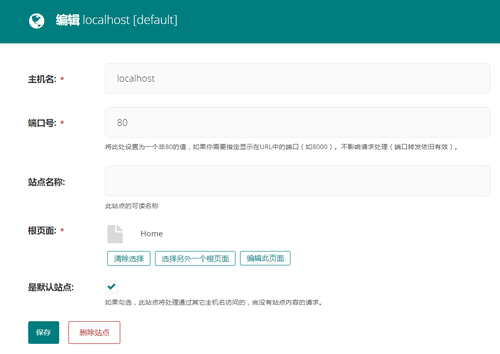
另外,"detail_url"中的主机名和端口号,还可以通过在项目settings.py中增加 WAGTAILAPI_BASE_URL配置来改变。
总结
Wagtail 基于Django REST Framwork 提供了专用的Wagtail API 模块(wagtail.api.v2 ),可以很方便地将原始内容以 JSON API 的方式开放给客户端使用。使用Wagtail API,只需要经过简单配置,就可以提供开放的API,非常适合用于开发前后端分离的项目。
 冀公网安备 13010402001886号