Q-Logo 我的学习笔记分享

Entries for date "2020"

JavaScript 字符串split 方法用多个字符进行分割并去除空值

原始字符串并不规则(数据清理时常会遇到这种“脏”数据),可能既有逗号分隔符,又有分号分隔符,结尾处还有一个额外的分号

var mystring = "10,20;30,40,";

这种情况下,直接用mystring.split(",")得到的将不是想要的结果,"20;30"不会被分开,且数组中会有空值""

["10","20;30","40",""]

解决的办法就是,使用正则表达式指定多个分割符,再用filter 方法过滤去除数组中的空值:

var myarray = mystring.split(/[,;]/).filter(item => item !== '')

这样,得到的结果是

["10","20","30","40"]
Vue 相同路由跳转时通过key 属性强制刷新组件

通过this.$router.push 跳转到其他路由,当要跳转到的路由和当前路由相同时(例如都是跳转前后路由都是'/postlist/',但查询参数不同的情况),会出现组件页面不刷新的问题。例如,当前页面是文章列表'/postlist/',需要跳转到某一分类的文章列表'/postlist/?categories=1',跳转代码是这样的

this.$router.push({ path: '/postlist/', query: { categories: cid } }).catch(err => err)

代码执行后,对应的组件本身并没有被刷新。这是vue的默认行为,同样的一个路由,多次push时,页面不会再次刷新和发送请求 。

最简单的办法,就是将上面变化的参数绑定到<router-view/> 中key属性。例如:

<router-view :key="$route.path + $route.query.categories"></router-view>

这样修改之后,this.$router.push时,只要query 的categories参数发生变化,对应的<router-view/> 组件就会被刷新了。

Vue 路由报错Navigating to current location ("/postlist/") is not allowed

局部解决

在报错的push 语句后面增加catch ,例如:

this.$router.push({ path: '/postlist/', query: { categories: cid } }).catch(err => err)

这样修改后,就不会再报上面的错误了。

全局解决

在导入vue-router之后,重写push方法增加catch 。具体就是在src/router/index.js 里面import Router from 'vue-router' 之后进行修改,例如:

import VueRouter from 'vue-router'

const stdPush = VueRouter.prototype.push

VueRouter.prototype.push = function push(location) {

return stdPush.call(this, location).catch(error=> error)

}

在Wagtail 网站中为自定义内容类型创建 API 端点路径

在 在Wagtail网站中提供 RESTful API 服务 一文中,介绍了怎样为Wagtail 内置的页面、图片、文档 等类型的内容配置API 端点路径,其中也提到,如果要增加新的内容类型,可以继承路径基类 wagtail.api.v2.views.BaseAPIViewSet ,本文以类型为BlogCategory 的Snippet 为例,介绍怎样为其创建API 路径端点。创建好之后,API 响应如下:

{
"meta": {
"total_count": 2
},
"items": [
{
"id": 1,
"meta": {
"type": "blog.BlogCategory",
"detail_url": "http://api.example.com/api/v2/categories/1/",
},
"name": "Test",
"slug": "category-test-1"
},
{
"id": 2,
"meta": {
"type": "blog.BlogCategory",
"detail_url": "http://api.example.com/api/v2/categories/2/",
},
"name": "Hello",
"slug": "category-test-2"
}
]
}

Pandas数据整理实战 - 合并+填充+丢弃缺失

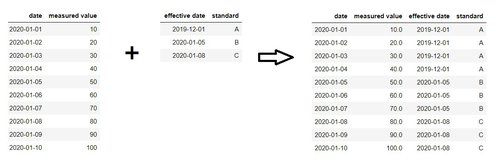
在进行数据处理时,有时会需要将这样的两个表整理成一个表,如下图所示

pandas-merge-fillna-dropna.jpg

第一个表中为每日测量值,第二个表中是标准生效日期,第一个表中每日的测量值,是依据当日之前最新的标准进行测量得到的值。按照这个规则可以整理得到第三个表,这个表综合显示每日测量值所依据的标准和标准生效日期。

使用pandas , 可以综合运用合并、填充和丢弃缺失等方法,来从表1和表2得到表3:

pdm = pd.merge(df1,df2,how='outer',left_on='date',right_on='effective date',sort=True).fillna(method='ffill').dropna()